
POS Printers
Receipt printers for your POS.
Fast 3-inch thermal printers that pair with a Windows or Android POS over USB or LAN. No ink, ever.
Thermal POS receipt printers (80mm) for any billing software
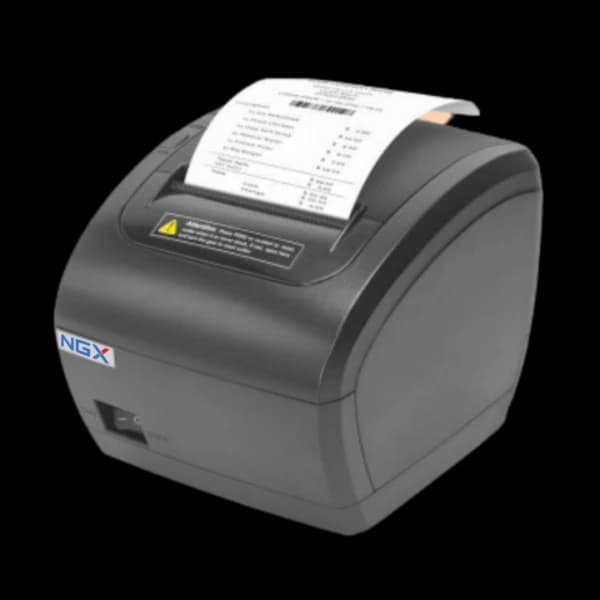
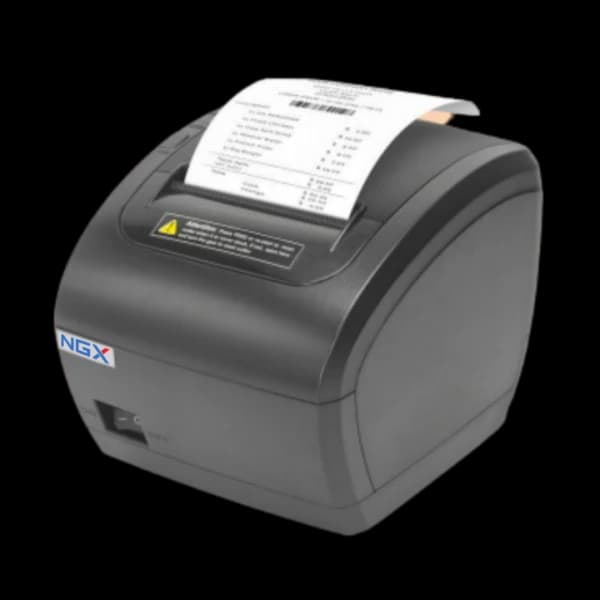
A POS printer turns your computer or Android POS into a billing counter — it prints fast 3-inch (80 mm) thermal receipts with an auto-cutter, using ESC/POS so it works with virtually any billing software. NGX offers the TP909-U over USB and the TP909-UL with USB plus LAN.
Thermal printing means no ink and no cartridges — paper is the only consumable. Print speeds up to 230 mm/s keep the queue moving, and drivers cover Windows, Linux, Android and Mac.
Not sure whether you need a counter printer or a portable one? Start with the full range of thermal printers.
01
Plug in and print.
Connect over USB or Ethernet to any POS setup and print fast, clear 3-inch receipts.
02
No ink, no cartridges.
Thermal printing means paper is the only consumable — a few thousand rupees a year for a busy counter.
What to look for in a POS printer
Connection
USB is simplest; add LAN (Ethernet) to place the printer anywhere on your network.
Speed and cutter
Look for 200+ mm/s and an auto partial cutter for busy counters.
Compatibility
ESC/POS emulation and broad driver support means it works with your existing software.
Running cost
Thermal paper only — a few thousand rupees a year, and never any ink.
Read before you decide.
Before you buy.
What's the difference between the TP909-U and TP909-UL?
The TP909-U connects over USB; the TP909-UL adds a LAN (Ethernet) port so you can place it anywhere on your network.
Which POS do they work with?
Both pair with the NGX Windows Touch POS and Android terminals, and work with standard ESC/POS billing software.
What is a POS printer?
A POS printer is a receipt printer that connects to a computer or POS terminal and prints the bill your billing software generates. It is a peripheral, not a standalone billing machine — the software does the billing and the printer just prints. NGX POS printers are 3-inch (80 mm) thermal printers, so there is no ink or ribbon to replace, and they use ESC/POS so they work with virtually any Windows or Android billing software. From ₹9,999.
How fast does a POS printer print?
The NGX TP909-U and TP909-UL print at 230 mm/s on 80 mm (3-inch) thermal paper, with a partial auto-cutter rated for 1.5 million cuts — fast enough to clear a busy counter queue without the printer becoming the bottleneck.
Is a POS printer the same as a billing printer machine?
Not quite. A POS printer prints receipts for a computer or POS that runs the billing software. A standalone billing machine — like the NGX NBP100 or Billstar — has the billing built in and prints the bill itself, with no PC. If you already bill from a computer you want a POS printer like the TP909-U; if you want an all-in-one that bills and prints on its own, you want a billing machine.
Which printer is used in a POS machine?
A POS machine uses a thermal receipt printer — almost always 3-inch (80 mm) at a counter, and 2-inch (58 mm) on a handheld. Thermal is used rather than inkjet or laser because there is no ink or ribbon to replace and a receipt prints in well under a second. The NGX TP909-U and TP909-UL are 3-inch thermal POS printers that work with any Windows, Linux, Android or Mac billing software over ESC/POS.
What is the price of a POS printer?
The NGX TP909-U (USB) and TP909-UL (USB + LAN) are both ₹9,999 + GST. That is a one-time price direct from the manufacturer, with no monthly software fee — the printer prints for billing software you already run, so there is nothing further to subscribe to.
How do I install a POS printer driver?
Download the TP900 driver setup from the NGX downloads page, extract the ZIP and run the installer, then pick the printer in your billing software. Windows drivers are supplied as ZIP files. For Linux, Android or Mac drivers, or help installing one, ask NGX support and they will send the right file for your model.
How do I install a POS printer?
Connect it to your PC or POS terminal — USB on the TP909-U, or Ethernet on the TP909-UL if you want to place it anywhere on the network — then load an 80 mm thermal roll, install the driver and select the printer in your billing software. The auto partial cutter needs no separate setup; it works as soon as the driver is in.
Get a demo in your city.
84 dealers. 8 resident city teams. A machine on your counter this week — with a person who installs it, not a courier box.