
Introduction
The checkout counter is the heartbeat of any retail store. It is where the sale happens and where the customer experience ends. But in 2024, the "counter" isn't always a physical desk.
Retailers today are often torn between two distinct technologies: the traditional, robust Desktop POS systems and the sleek, portable Handheld Android POS devices (similar to our popular NUNIX or OMIE style models).
Choosing the wrong one can lead to slow queues, wasted counter space, or overspending on hardware you don't need. In this retail billing system comparison, we break down the pros and cons of Handheld POS vs. Desktop POS to help you find the perfect fit.
The Contender: Mobile (Handheld) Android POS
The Space-Saver and Line-Buster
Handheld POS devices are essentially smartphones with built-in printers and barcode scanners. Running on Android, they are familiar to use and highly versatile.
Top Android POS Machine Benefits:
- Unmatched Mobility: You aren't tied to a desk. In a Quick Service Restaurant (QSR), staff can take orders tableside. In a clothing store, you can bill a customer right where they are standing.
- Space Efficiency: For small kiosks, food trucks, or coffee shops where every inch of counter space counts, these devices are a lifesaver. They eliminate the need for a monitor, CPU, keyboard, and mouse.
- Cost-Effective: generally, Android handhelds are significantly more affordable than full desktop setups. They consume less power and require less cabling.
- All-in-One Design: Most mobile POS devices from NGX come with a built-in thermal printer and scanner, meaning you don't need to buy peripherals separately.
Best For:
- Cafes and QSRs (Quick Service Restaurants).
- Food Trucks and Pop-up stalls.
- Parking Lot Management.
- Boutiques with low-to-medium daily footfall.
The Veteran: Desktop POS Systems
The Heavy-Duty Workhorse
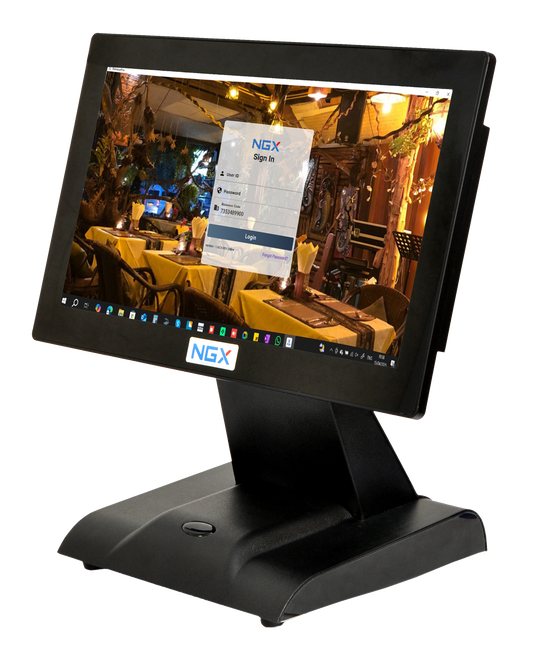
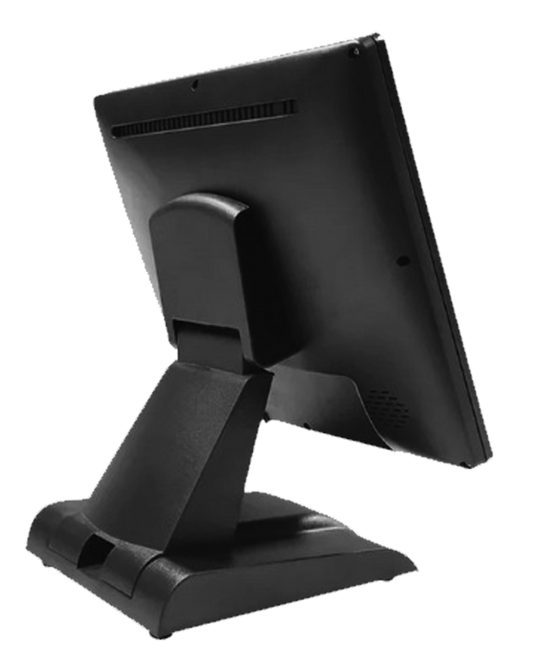
The Desktop POS is the classic computer-based setup. It typically features a large touchscreen monitor, a heavy-duty stand, and wired connections to multiple peripherals.
Top Desktop POS Benefits:
- Screen Real Estate: The large screen is crucial for complex inventory management. If you have thousands of SKUs (items) and need to see detailed dashboards, stock levels, and customer history simultaneously, a desktop screen is superior.
- Connectivity: These systems have multiple ports (USB, LAN, COM) to connect heavy-duty barcode scanners, weighing scales, cash drawers, and card swipe machines all at once.
- Durability & Volume: Desktop POS printers are designed for high-speed, non-stop printing. If you have a long queue of 20 people, a desktop system processes transactions faster and more robustly than a battery-operated device.
Best For:
- Supermarkets and Grocery Stores.
- Departmental Stores.
- Pharmacies with vast inventories.
- Wholesale Distributors.
Comparison Table: Handheld POS vs. Desktop POS
|
Feature |
Handheld (Mobile) POS |
Desktop POS |
|
Size & Form |
Compact, fits in hand/pocket |
Large, sits on a counter |
|
Operating System |
Typically Android |
Windows or Android |
|
Mobility |
High (Bill anywhere) |
Low (Fixed location) |
|
Power Source |
Rechargeable Battery |
Direct Power Supply |
|
Peripheral Ports |
Limited (Usually USB-C/Bluetooth) |
Extensive (Multiple USB, LAN, Serial) |
|
Ideal Volume |
Low to Medium Traffic |
High Traffic / Bulk Items |
Verdict: Which One Do You Need?
To make the right choice, look at your checkout flow.
Choose the Mobile/Handheld POS if:
You run a business where speed and floor space are premium commodities. If you want to "bust the queue" by walking up to customers to bill them, or if you run a delivery-heavy business (like a cloud kitchen), the Android POS is your best friend. It is also the perfect entry-level device for startups keeping costs low.
Choose the Desktop POS if:
You run a traditional retail model where customers bring baskets of goods to a fixed counter (like a supermarket). If you need to connect a weighing scale directly to the billing machine or handle thousands of transactions a day without worrying about battery life, the Desktop POS is the professional choice.
The Best of Both Worlds?
Many smart retailers are now using Hybrid Systems. They use a Desktop POS for the main counter and keep an NGX Handheld POS on standby for rush hours to line-bust or handle deliveries.
Ready to streamline your checkout?
Whether you need the mobility of Android or the power of a Desktop, NGX Technologies has you covered.